Ngày nay, VPN không chỉ đơn thuần là một công cụ bảo vệ quyền riêng tư và bảo mật. Với sự phổ biến của xu hướng “cắt cáp” cùng với sự gia tăng của việc kiểm duyệt internet và các bất công khác trên mạng, VPN đã trở thành công cụ lý tưởng để bỏ chặn và truy cập vào các nội dung bị giới hạn theo khu vực địa lý.
Tuy nhiên, đôi khi VPN không thể thực hiện được nhiệm vụ này vì nhiều lý do khác nhau, và bạn có thể không truy cập được nội dung bị hạn chế, hoặc thậm chí trải nghiệm “cắt cáp” của bạn sẽ trở nên bực bội. Chủ yếu, vấn đề xuất phát từ dịch vụ định vị, và bạn có thể nhanh chóng giải quyết vấn đề này bằng cách xác minh vị trí VPN của mình. Ví dụ, nếu bạn là cư dân Mỹ và đã kết nối với một máy chủ ở Anh, hãy kiểm tra xem dịch vụ định vị IP có cho biết bạn đang ở Anh hay không. Nếu các dịch vụ này cho thấy bạn vẫn đang ở Mỹ, hãy thực hiện các bước sau:
 Tắt các dịch vụ định vị và xác định vị trí
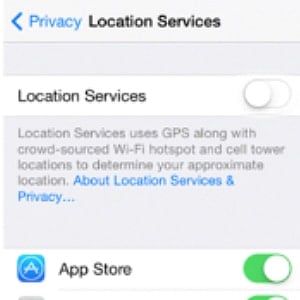 Tắt các dịch vụ định vị và xác định vị trí
Các dịch vụ VPN không thể truy cập nội dung bị giới hạn theo khu vực do vị trí mặc định được thiết bị của bạn đăng ký. Mặc dù trên internet, hầu hết các dịch vụ đều dựa vào vị trí được xác định qua địa chỉ IP, nhưng đôi khi chúng có thể yêu cầu truy cập vào vị trí thực tế của bạn, và điều này sẽ ghi đè lên thông tin từ địa chỉ IP. Tình hình sẽ còn tồi tệ hơn nếu bạn đã bật tính năng định vị trên điện thoại thông minh, vì các dịch vụ này sử dụng hệ thống định vị GPS.
Nếu bạn đang cố gắng truy cập một số nội dung bị giới hạn theo vị trí địa lý, bạn có thể cảm thấy bực bội vì không nhận được kết quả như mong muốn. Để tránh vấn đề này, hãy luôn tắt dịch vụ định vị khi kết nối VPN. Ngoài ra, bạn cũng có thể sử dụng dịch vụ giả định vị trí.
 Xóa cookie
 Xóa cookie
Dịch vụ định vị địa lý có thể đã bị tắt, nhưng VPN của bạn vẫn không thể bỏ chặn nội dung từ khu vực khác. Tình trạng này xảy ra khi bạn cố gắng truy cập các trang web mà bạn đã từng truy cập trước đó. Nguyên nhân là do những tệp tin nhỏ được lưu trữ trong trình duyệt của bạn, được gọi là cookie. Cookie thu thập rất nhiều thông tin, và một số trong số chúng thực hiện các chức năng theo dõi và giám sát. Khi cookie vẫn còn tồn tại, bất cứ khi nào bạn cố gắng truy cập một trang web, trang web đó sẽ sử dụng cookie, và bạn sẽ nhận được những kết quả không mong muốn. Hãy luôn xóa cookie hoặc sử dụng chế độ ẩn danh nếu bạn gặp phải các kết quả không mong muốn khi sử dụng VPN.
Kiểm tra xem có rò rỉ DNS và IP hay không
Hai vấn đề trên có thể không ảnh hưởng đến các dịch vụ VPN uy tín, nhưng hiện tượng rò rỉ lại nguy hiểm hơn. Không chỉ khiến bạn gặp phải những kết quả không mong muốn do vị trí địa lý, mà quyền riêng tư và an ninh của bạn cũng sẽ bị đe dọa. Rò rỉ DNS/IP sẽ tiết lộ hoạt động của bạn cho những kẻ tò mò vì khi chúng xảy ra, tình huống sẽ giống như bạn không sử dụng VPN. Rò rỉ xảy ra khi thiết bị của bạn tự động chuyển sang sử dụng DNS mặc định do nhà cung cấp dịch vụ internet (ISP) gán thay vì DNS do VPN cung cấp. Các trường hợp rò rỉ khác có thể do tính năng WebRTC của trình duyệt gây ra. Hãy luôn kiểm tra xem có rò rỉ hay không và tắt tính năng WebRTC trong trình duyệt.
Chọn một máy chủ VPN khác
Nếu bạn đã thực hiện các bước trên mà vẫn không thể truy cập nội dung bị giới hạn theo khu vực, đã đến lúc bạn nên thay đổi máy chủ VPN. Hầu hết các dịch vụ, ví dụ như Netflix và BBC iPlayer, có thể chặn toàn bộ dải địa chỉ IP do một máy chủ cụ thể cung cấp. Về cơ bản, máy chủ đó sẽ không thể truy cập thành công vào các dịch vụ này và do đó, bạn sẽ nhận được thông báo lỗi. Đây là lý do tại sao bạn có địa chỉ IP của Mỹ nhưng vẫn không thể truy cập Netflix Mỹ. Tất cả những gì bạn cần làm là kết nối với một máy chủ khác tại Mỹ.