串流熱潮已席捲而來。說實話,這更像是串流時代的來臨。隨著高速網路的普及,加上電腦、筆記型電腦、平板電腦、智慧型手機,以及 Fire TV、Fire Stick、Roku、智慧電視等其他適用裝置的普及,我們已具備一切所需,可以擺脫有線電視的束縛,在線上盡情享受喜愛的電影和電視節目。
Apple TV 是市面上用於串流影片和網路內容的設備中,效率最高、最便攜且功能最強大的產品之一。最貼切的描述是:它是一款數位媒體播放器,只需搭配 HDMI 線和電視,即可讓您盡情享受最受歡迎的線上內容。
 小巧但功能強大:認識Apple TV
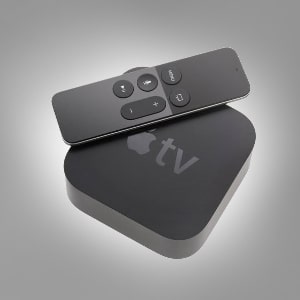 小巧但功能強大:認識Apple TV
Apple TV 是一款機上盒,只要連接網路並搭配電視使用,全球用戶便能享受多媒體內容庫及線上串流服務,例如 Netflix、Hulu、Pop Corn Time、BBC iPlayer、Amazon Prime Video、iTunes Store、DirecTV、Vue、PlayStation、Now TV 等眾多服務。它隨附遙控器,亦可透過 Apple TV Remote 應用程式進行操控。
然而,與其他串流裝置一樣,Apple TV 僅允許您觀看您所在地區可用的內容;換言之,由於地理封鎖的限制,您將無法存取其他 Netflix 地區或海外服務。
VPN 技術:訪問您想要的內容
 VPN 技術:訪問您想要的內容
To overcome that issue, you need to setup a VPN on your Apple TV. Virtual Private Networks, or VPN, are online apps that can hide your online identity and location, allowing you to use one of their virtual servers strategically placed in other countries so you can unblock Internet content on them. For example, if you have an Apple TV but you are in Spain, you won’t have the right to access the American Netflix region, Hulu, and other US-based platforms. However, if you spoof your location with a VPN and acquire an American IP number, those services will become available to you.
網路上有許多公司提供 VPN 技術,因此您需要審慎選擇。IPBurger因其高速連線、安全的加密技術,以及提供共享與專用兩種 IP 位址而備受推薦。其月費方案價格相當實惠,起價為 5 美元,最高為 9.58 美元。
如何在蘋果電視上設置 VPN
不幸的是,此數位媒體播放機不支援本機VPN,因此如果要在Apple TV上設置VPN,則需要執行一系列步驟。有兩種方法可以實現您的目標:
- 直接在路由器上設置 VPN
- 在 PC 或 Mac 上設置 VPN,並將其用作 Wi-Fi 熱點
如何使用路由器方法在蘋果電視上設置 VPN
若您實作路由器方案,即表示您將直接在路由器上設定 VPN,而所有連接到該路由器的裝置都將受益於虛擬私人網路所提供的內容加密以及資料隱私與安全性。要安裝 VPN,您需要一台搭載 Tomato 或 DD-WRT 韌體的路由器。
如何將Mac或PC配置為虛擬路由器
通過這樣做,您將使用PC或Mac作為路由器,以提供與Apple TV的VPN連接。以下是在兩個作業系統上執行此操作的步驟:
如何與 Apple TV 共享 Mac VPN 連接
- 打開 Mac 電腦。
- 訪問 「系統偏好設置」功能表。
- 選擇 “分享。”
- 在那裡,選擇「互聯網共用」,這將提示互聯網共用 選項出現在顯示幕的右側。
- 然後,配置以下設置:
- 從 [您發起的 L2TP 協定 VPN 連接] 共用您的連接
- 對於使用的計算機:選擇Wi-Fi框。
- 然後,按下Wi-Fi選項。
- 鍵入 以下資訊:
- 分配 所需的網路名稱。
- 在「頻道」中,將其保留為預設值。
- 在「安全性」中,將其配置為“WPA2 個人”。
- 選擇密碼 並進行驗證。
- 之後 ,按下確定”
- 轉到 共用功能表。
- 選中 「互聯網共用」旁邊的框。
- 出現提示時,打開「互聯網共用」,然後按兩下開始」。
- 後 互聯網共享啟動后,您將在綠燈旁邊看到一條文字,上面寫著“互聯網共享:開啟”。
- 是時候打開你的蘋果電視了。
- 訪問 設置。
- 轉到 網路。
- 之後,轉到Wi-Fi。
- 與您最近在 Mac 上設定的 Wi-Fi 網路建立連接。
如何與蘋果電視共用PC VPN連接
- 打開 你的電腦。
- 按 Windows + S。它將使搜索欄出現。
- 之後,編寫cmd以使命令提示符出現。
- 右鍵按下 命令提示符,選擇“以管理員身份運行”。
- 寫這個: netsh wlan set hostednetwork mode=allow ssid=NETWORKNAME key=PASSWORD
- 設定 以下模式來命名您的「路由器」
- ssid=[選擇一個名字]
- 金鑰=[選擇密碼]
- 完成後,按 Enter 鍵。
- 將顯示此消息:「託管網路模式已設置為允許。
- 現在,您的網路的SSID或名稱以及使用者密鑰密碼已被修改。
- 下一步 是啟動虛擬路由器。在命令提示符下寫下以下內容:netsh wlan start hostednetwork。
- 按 回車鍵。
- 您將確認 您的路由器已成功啟動,您看到以下消息:「託管網路已啟動。
- 訪問 「打開網路和共用中心」,右鍵按下右側螢幕下方的Wi-Fi圖示。
- 轉到 “更改配接器設置。”
- 右鍵按兩下最近建立的 VPN 連線。
- 之後,訪問“屬性”。
- 現在,打開“共用”選項卡。
- 您將選取兩個框: 第一個是「允許其他網路使用者通過此電腦的互聯網連接進行連接」 ,另一個是「允許其他網路使用者控制或禁用共用的互聯網連接」 一個。
- 選擇 您最近配置的VPN連接,位於「家庭網路連接」 下方。
- 選擇「 確定」。
- 是時候打開你的蘋果電視了。
- 訪問 設置。
- 轉到 網路。
- 之後,轉到Wi-Fi。
- 與最近在電腦上配置的Wi-Fi網路建立連接。
總而言之,若要充分發揮裝置的串流功能,您需要學習如何在 Apple TV 上設定 VPN 連線。除了獲得保護與隱私外,您還能偽裝所在位置,並觀賞其他國家的內容。




